Choosing the Right Photography Log Book for Your KDP Publishing Project
For photographers looking to publish and sell a physical log book or planner on Amazon’s Kindle Direct Publishing (KDP) platform, the interior design and file preparation are critical, often overlooked hurdles. The Photography Log Book – KDP Interior’s represents a specific category of product: a pre-designed, fully editable template bundle intended to streamline this process. Understanding what this offering entails, how it compares to other approaches, and where its strengths and limitations lie can help you make an informed decision for your project.
What Is the Photography Log Book – KDP Interior’s Bundle?
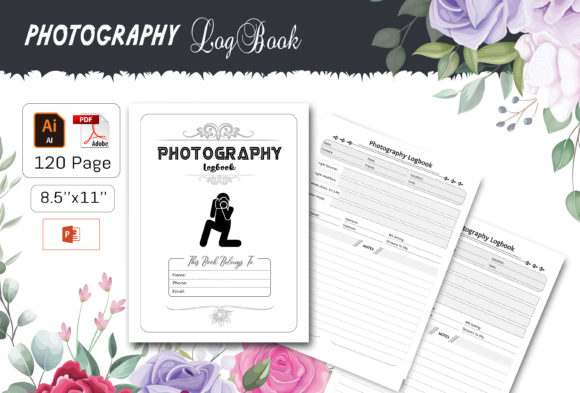
Unlike a finished, printed book you might purchase for personal use, the Photography Log Book – KDP Interior’s is a digital asset pack designed for creators. Its core purpose is to provide a complete, formatted interior layout ready for adaptation and publication. The bundle typically includes a 120-page structure sized at 8.5" x 11" with no bleed, which is a standard requirement for many KDP paperback interiors. The key distinction lies in its file variety and editability. It provides source files in Illustrator AI/EPS, Microsoft PowerPoint PPT, JPEG images, and a final print-ready PDF. This multi-format approach, coupled with features like fully editable vector shapes and easy color changes, positions it as a toolkit rather than a static template.
Core Features and Practical Applications
Examining the listed features reveals its intended use cases. The inclusion of an editable Illustrator CC 2019 file is significant for users with graphic design software access, allowing deep structural changes to layouts, fonts, and graphical elements. The PowerPoint file offers a more accessible route for those comfortable with that software to edit text and rearrange pages. The accompanying JPEGs and PDF provide fallback options and a final upload-ready version. The “100 vector shapes re-sizable” feature suggests it includes icons, decorative elements, or organizational graphics pertinent to a photography log—such as camera icons, checkboxes, or rating scales—that can be tailored.
A practical example: a photographer wants to publish a specialized log for studio portrait sessions. Using the Photography Log Book – KDP Interior’s PowerPoint file, they can quickly modify section headers, replace example text with their own prompts for client names, lighting setups, and equipment used, and use the vector shapes to create custom markers for successful shots. They then export to the provided PDF format for a straightforward KDP upload.
Comparing Approaches: Custom Design vs. Template Bundles vs. Basic Tools
When evaluating how to create a KDP photography log book interior, you generally face three broad paths: custom professional design, using a pre-made template bundle like this one, or building from scratch with basic word processing or design tools.
Custom Professional Design
Hiring a graphic designer yields a unique, brand-aligned product tailored to every specification. This is the strongest option for establishing a distinct market presence or handling complex layouts. However, it is the most costly and requires clear communication of your vision. It offers no inherent reusability for future projects. The Photography Log Book – KDP Interior’s bundle sits in contrast as a cost-effective, reusable starting point where you retain full control over the final edits.
Building from Scratch with Basic Tools
Creating a log book interior directly in software like Microsoft Word, Google Docs, or even Canva is feasible. It offers maximum freedom and minimal upfront cost. The tradeoff is immense time investment in achieving a professional, consistent layout across 120 pages, ensuring KDP technical compliance (like margins and bleed settings), and designing usable graphical elements. This approach often results in a product that looks less polished. The template bundle essentially prepays that design time, providing a professional baseline structure that you then customize, potentially saving dozens of hours.
Key Strengths and Potential Limitations of the Template Bundle
The strengths of the Photography Log Book – KDP Interior’s are clear in certain contexts. Its primary benefit is time efficiency. For a photographer with intermediate software skills (in either Illustrator or PowerPoint), it removes the blank-page hurdle. The multi-format support increases accessibility; not everyone has Illustrator, but many have PowerPoint. The print-ready PDF guarantee reduces technical anxiety about KDP upload errors. Furthermore, the editable vectors allow for a degree of branding—you can adjust colors to match your cover or website palette.
Limitations exist and are important to consider. The design is fixed in its fundamental page count and structure (120 pages, no bleed). If your concept requires a 6" x 9" book, a bleed option, or a significantly different page count, this bundle may not suit your needs without extensive, expert-level redesign in Illustrator. Its generic “photography log” focus means you must invest effort to specialize it for your niche, whether that’s wedding, wildlife, or astrophotography. Lastly, while editable, achieving a highly polished, unique result still demands a decent level of design sense; otherwise, the final product may look too similar to others using the same template.
Decision Factors: When Is This the Right Choice?
Choosing the Photography Log Book – KDP Interior’s bundle is likely the right fit under several conditions. First, if you possess moderate comfort with either Adobe Illustrator or Microsoft PowerPoint and value a balance between control and speed. Second, if your project aligns with the standard 8.5" x 11" no-bleed paperback format and a page count around 120. Third, if your budget for the project is limited but you still want a professionally structured foundation. Finally, it is a strong option if you plan to create multiple or updated versions of your log book over time, as you can reuse and modify the core files.
When to Consider Other Options
You might need to look beyond this template bundle in specific scenarios. If you have absolutely no experience with design software and cannot dedicate time to learn basic editing in PowerPoint, a more hands-off service—or a simpler Word-based approach—might reduce frustration. If your photography log concept is highly unconventional in layout (e.g., heavily image-based, requires integrated calendars, or needs a pocket-sized format), the constraints of a pre-built template could hinder more than help. In cases where brand uniqueness is paramount to your marketing strategy, the investment in a custom design may yield better competitive differentiation.
Evaluating Your Own Needs and Resources
A practical comparison starts with a self-assessment. List your technical skills, available time, budget, and vision for the final book. Compare the cost of this template bundle against the hours you would spend designing from zero or the fee for a freelance designer. Consider the software you already own: if you have Illustrator, the AI file unlocks deep customization; if you only have PowerPoint, confirm the provided PPT file is sufficiently powerful for your planned edits. Reviewing the example pages or descriptions of the template’s default layout can help gauge how much alteration you’ll need to make it feel uniquely yours.
Ultimately, products like the Photography Log Book – KDP Interior’s exist to fill a specific gap in the KDP publishing workflow: the need for a quality, adaptable starting point. They are not a one-size-fits-all solution, but for many photographer-publishers, they represent a sensible middle ground between the expense of full customization and the immense effort of starting from a blank document. By weighing its features against your own project requirements and skill set, you can determine if it is the resource that will efficiently bridge your idea to a finished, publishable product.