Creating Your Own Food Planner with KDP Interiors
Imagine having the power to create a beautifully designed, completely customizable food planner. You can tweak the colors, adjust the layout, and add your own branding, all without needing advanced design skills. This is the core idea behind Food Planner – KDP Interior’s. It’s a collection of professionally formatted templates designed specifically for Amazon’s Kindle Direct Publishing platform, allowing anyone to produce their own printable or digital planners.
What Exactly Are KDP Interior Templates?
At its simplest, a KDP interior is the complete inside layout of a book. For planners, this means all the pages—the calendars, weekly spreads, tracking sections, and any decorative elements. The Food Planner – KDP Interior’s provides this complete interior skeleton. You receive a set of files that are already structured, tested, and ready to be personalized. Instead of starting from a blank page and wrestling with margins, fonts, and alignment, you start from a polished, functional foundation.
These templates solve a significant problem for creators: time and technical expertise. Designing a 120-page planner from scratch requires considerable effort. With this KDP interior, that heavy lifting is already done. The value lies in the transition from idea to finished product being dramatically shortened.
Key Features and Practical Benefits
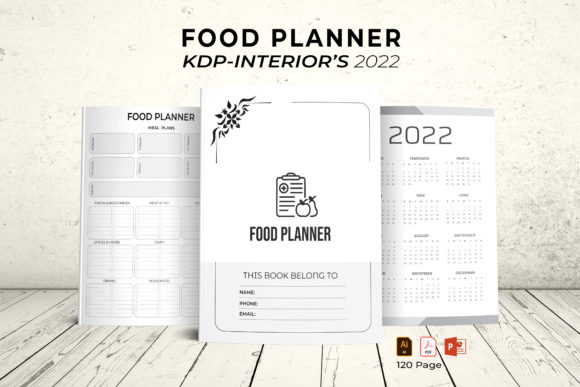
The specific offering, the 2022 Food Planner – KDP Interior’s, includes a full 2022 calendar and is packed with features that cater to both beginners and seasoned publishers.
- Multi-Format Files: You get the original vector files (AI/EPS) for deep editing in Illustrator, a PowerPoint file for simpler adjustments, JPEG images for quick use, and a print-ready PDF. This flexibility means you can work with the tools you’re comfortable with.
- Full Editability: Everything is resizable and customizable. Change colors to match your brand, reposition elements, or even modify the layout if you wish.
- Print-Ready Specifications: The files are set to US Letter size (8.5 x 11 inches) with 300 DPI quality and no bleed, making them perfect for home printing, office printers, or professional print shops.
- Ready to Upload: The included PDF is formatted to KDP’s requirements, so you can upload it directly to publish your planner.
The inclusion of 100 vector shapes is a particularly useful asset. These can be used as decorative icons, checkboxes, or visual markers throughout your planner, adding a polished, consistent graphic style without needing to source them elsewhere.
Who Can Use a Food Planner KDP Interior?
The appeal of this template extends across a wide audience. It’s not just for professional designers.
- Entrepreneurs & Small Business Owners: Create a branded food planner to sell on Amazon KDP, adding a unique product to your portfolio. It’s a tangible item that can complement a blog, coaching service, or health brand.
- Bloggers & Content Creators: Offer a custom planner as a premium download for your audience or as a physical product to generate additional revenue. It deepens engagement with your community.
- Educators & Coaches: Nutritionists, wellness coaches, or cooking instructors can create tailored planners for clients or students, providing a practical tool that reinforces their teachings.
- Freelancers & Hobbyists: If you enjoy organization or light design work, this template allows you to craft a personal planner exactly to your taste or to create gifts for friends and family.
- Casual Users: Even if you don’t plan to sell it, you can use the editable files to make a single, perfect planner for your own kitchen. Adjust it to track grocery budgets, meal prep, or dietary goals.
Realistic Applications and Use Cases
Consider a freelance nutritionist who wants to provide clients with a bespoke planning tool. Using the Food Planner – KDP Interior’s, she can open the PowerPoint file, which is often more accessible than professional design software. She changes the primary color to her brand’s green, adds her logo to the cover page, and perhaps inserts a few extra notes pages tailored to her program. Within an hour, she has a professional, client-ready planner ready to print or share digitally.
For a small business owner selling homemade spice blends, a custom food planner could be a fantastic cross-promotion. He could use the Illustrator file to add illustrations of his products throughout the planner, creating a unique item that drives brand loyalty and serves as a standalone product on his KDP store.
The template’s structure also supports varied focuses. You could emphasize weekly meal prep, calorie tracking, recipe inventory, or seasonal eating. The editable nature means the same core template can be adapted for dozens of different niche applications.
Important Considerations Before You Begin
While the template is designed to be beginner-friendly, having a clear plan will help you use it most effectively.
First, consider your end goal. Are you creating a planner for personal use, for a small client group, or for mass sale on Amazon? This will determine how much customization you need. For personal use, the PDF or JPEGs might suffice. For commercial use, you’ll likely want to edit the vector files to ensure uniqueness.
Second, assess your software comfort level. The template provides files for Illustrator, PowerPoint, and basic image formats. If you’ve never used Illustrator, the PowerPoint (PPT) file is an excellent alternative for making fundamental changes like colors and text. It’s a gateway to customization without the steep learning curve.
Finally, understand the KDP process if you plan to publish. The included no-bleed PDF is ready for upload, but you’ll still need to navigate KDP’s setup for cover design, pricing, and description. The interior template handles the most technically demanding part, but publishing the final book involves other steps.
Making the Template Work for You
The true power of the 2022 Food Planner – KDP Interior’s is its role as a starting point, not a rigid product. Its 120-page structure gives you room to experiment. You might decide to combine pages, remove a section, or duplicate a particularly useful weekly layout. Because the elements are vector-based and resizable, your modifications will maintain the professional quality.
For those interested in design, the vector shapes offer a playground for creativity. They can be recolored, scaled, and arranged to create entirely new visual themes. This turns the template into not just a planner layout, but a graphic asset library.
Whether your aim is to build a business, enhance your professional services, or simply create a more organized kitchen routine, this KDP interior transforms a complex design project into an achievable, editable, and highly practical endeavor. It bridges the gap between a great idea and a tangible, useful product.