The Ultimate KDP Family Planner Interior: Your Blueprint for Organized Productivity
For creators, entrepreneurs, and anyone managing the complex logistics of modern life, the ability to streamline planning is a critical skill. Enter the Family Planner – KDP Interior’s, a specialized digital tool designed to transform chaotic schedules into a clear, actionable system. It’s not merely a calendar; it’s a foundational interior layout file crafted specifically for the Amazon Kindle Direct Publishing (KDP) ecosystem. This product, particularly the 2022 Family Planner – KDP Interior’s version, serves as a pre-built, professionally formatted template ready for integration into your publishing workflow or personal productivity arsenal.
Understanding the Role in Your Creative or Business Process
At its core, a KDP interior file is a project asset. It fits into the workflow phase after initial concept development but before final product publication. If you are publishing a custom planner on Amazon, you would typically move from ideation to sourcing or creating the interior layout. The Family Planner – KDP Interior’s eliminates the most technical and time-consuming part of that step. It arrives as a tested, print-ready file, allowing you to bypass the intricate design work involving layout, pagination, and print specification. This shifts your focus from construction to customization and final assembly.
For non-publishers—such as professionals, educators, or small business owners—the file functions as a high-quality, editable organizational tool. Instead of purchasing a physical planner, you acquire a digital master file. This grants you control over its use: you can print copies for your office team, adapt it for a classroom schedule, or integrate its pages into your own hybrid digital-analog system. Its utility is defined by your process needs, not a single predetermined outcome.
Key Components and Their Practical Application
The specifications of the 2022 Family Planner – KDP Interior’s reveal its flexibility. The US Letter size (8.5 x 11 inches) is the standard for home and office printers in North America, ensuring compatibility without adjustment. The inclusion of multiple file types—Adobe Illustrator (.AI/.EPS), Microsoft PowerPoint (.PPT), JPEG, and PDF—means it interacts seamlessly with the software you likely already use.
- The Illustrator EPS file is a fully editable vector format. For graphic designers or those with access to vector software, this allows infinite modification: changing colors, resizing the 100 included shapes, or altering layouts without quality loss (300 DPI). This is crucial for branding consistency if you’re creating a planner for your business.
- The PowerPoint PPT file is a surprisingly powerful accessibility feature. PowerPoint is ubiquitous; its intuitive interface lets virtually any user edit text, rearrange elements, or add content. A teacher can quickly insert school event dates, and a freelancer can add client project milestones.
- The print-ready PDF with no bleed serves two primary functions. For KDP upload, it’s the final file you submit. For personal printing, it’s the stable master you send to your home printer, local print shop, or office copier. The “no bleed” specification simplifies this, as it requires no special trimming.
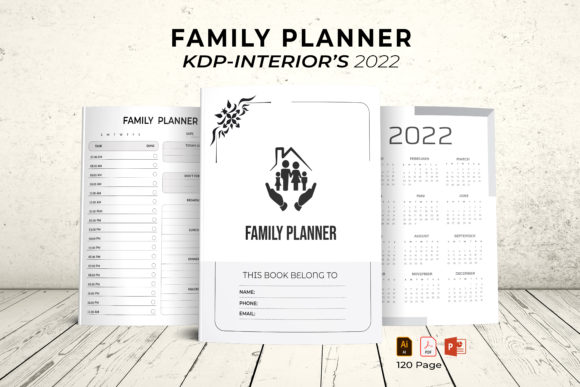
The total 120-page structure, including the cover and 2022 calendar, provides a comprehensive framework. You aren’t starting with a blank slate but with a logically sequenced document. This pre-organization saves hours of initial setup and ensures a professional page flow.
Integration into Diverse Workflows and Systems
The true value of a tool like this is measured by how well it connects with other elements of your work. Consider its interaction points.
For KDP Publishers and Content Creators
If your workflow involves publishing on Amazon, the Family Planner interior acts as a plug-in component. You would typically combine it with a separately designed cover file, input your specific product details in KDP’s dashboard, and upload the interior PDF. The file’s readiness accelerates your timeline from days to hours. It also ensures technical compliance, reducing the risk of upload errors that delay publication. For creators selling digital downloads on platforms like Etsy, the editable files (AI, PPT) become the product themselves, offered to customers who wish to customize their own planners.
For Team and Project Management
In a collaborative environment, the editable formats enable decentralized customization. A project manager can distribute the PowerPoint file to team leads, each of whom personalizes sections relevant to their deliverables. The resulting unified PDF becomes the team’s shared quarterly planner. This maintains visual and structural consistency across departments—a factor often overlooked in ad-hoc planning.
For Personal Productivity and Family Coordination
Individuals juggling professional and personal responsibilities can use the JPEG or PDF pages within digital note-taking apps. You might import a monthly calendar page into a tool like GoodNotes or OneNote, annotating it digitally throughout the month while also printing the weekly pages for a kitchen-wall display. This hybrid approach bridges digital convenience with physical visibility, a method favored by many who find screens insufficient for family-wide communication.
Practical Implementation: From Download to Daily Use
Acquiring the file is just the first step. Implementing it effectively requires a few practical considerations.
Start by auditing your current tools. Do you use primarily digital apps (Google Calendar, Trello) or physical notebooks? The Family Planner – KDP Interior’s can complement, not necessarily replace, these systems. Identify the gap: perhaps you lack a central, at-a-glance family schedule or a beautiful, motivating project tracker. The planner template fills that specific role.
Next, select your editing path based on your skill and time. If graphic design is not your forte, the PowerPoint route is your most efficient channel. Open the PPT file, navigate through the slide-based pages, and replace placeholder text with your own dates, events, and goals. The vector shapes are present as images you can move and resize. Change colors by using PowerPoint’s picture format tools. This process is straightforward and can be completed in a single sitting.
For advanced customization using the Illustrator file, ensure version compatibility (CC 2019 is noted). This path offers precision: you can alter the font taxonomy, redesign the layout of a tracking page, or extract individual icons to use across other materials. This is invaluable for maintaining brand alignment if the planner is part of a larger suite of business materials.
Finally, determine your output method. For KDP: upload the PDF. For personal use: if printing at home, ensure your printer settings match the 8.5x11” paper and that “scale to fit” is disabled. For a print shop, simply provide the PDF and specify no bleed needed. The high 300 DPI resolution guarantees sharp text and graphics on paper.
Long-Term Utility and Adaptability
A common pitfall of planner systems is their rigidity. The fully editable nature of this interior counters that. Its long-term value extends beyond 2022. While the included calendar is year-specific, the underlying structure of 120 pages—goal trackers, lists, weekly layouts—is perennial. After 2022, you can use the vector files to update the calendar section for 2023, 2024, and beyond. This turns a one-time purchase into a reusable template system.
The quality control is embedded in the product’s testing. Being “formatted and tested for KDP” means the margins, page order, and file structure meet Amazon’s stringent requirements. This reliability reduces anxiety for publishers and assures individual users that the pages will print correctly. Consistency in output, whether uploaded to a global marketplace or printed for a local team, is a fundamental efficiency gain.
In essence, the Family Planner – KDP Interior’s, particularly the 2022 edition, is more than a product. It is a process accelerator. It fits into the preparatory stage of publishing or the organizational phase of managing life and work. By providing multiple entry points (PPT for simplicity, AI for depth) and multiple exit points (digital upload, physical print), it adapts to your workflow rather than demanding you adapt to it. This flexibility, coupled with its professional foundation, makes it a pragmatic choice for anyone whose process demands clarity, order, and the freedom to customize.